Introduction to AutoCAD 2006 2D and 3D Design

Chapter 5: The Modify Tools

Aim of this chapter

To describe the uses of tools from the Modify toolbar.

Introduction

The Modify tools are among the most frequently used tools of AutoCAD 2006. Drag the Modify toolbar (Fig. 5.1) from its usual position into the drawing area.


Fig. 5.1: The Modify toolbar

The Erase tool was described in Chapter 2. Examples of the other tools other than the Explode follow. See Chapter 9 for Explode.

The Copy tool

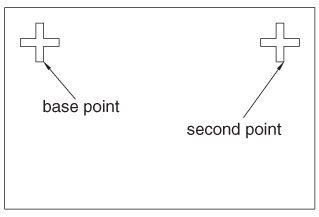
First example Copy (Fig. 5.4)

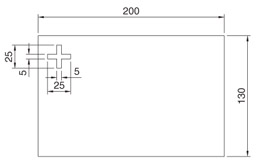
  1. Construct Fig. 5.3 using Polyline. Do not include the dimensions.

  2. Call the Copy tool either left-click on its tool icon in the Modify toolbar (Fig. 5.2), or pick Copy from the Modify drop-down menu, or enter cp or copy at the command line. The command line shows:

    Command:_copy
    Select objects: pick the cross 1 found
    Select objects: right-click
    Specify base point or displacement: end of pick
    Specify second point of displacement or : pick
    Specify second point of displacement: right-click
    Command:


    Fig. 5.2: The Copy tool icon from the Modify toolbar


    Fig. 5.3: First example Copy outlines


    Fig. 5.4: First example Copy

First example Multiple copy (Fig. 5.5)

  1. Erase the copied object.

  2. Call the Copy tool. The command line shows:

    Command:_copy
    Select objects: pick 1 found
    Select objects: right-click
    Specify base point or displacement: Specify base point:

UNLIMITED FREE
ACCESS
TO THE WORLD'S BEST IDEAS

SUBMIT
Already a GlobalSpec user? Log in.

This is embarrasing...

An error occurred while processing the form. Please try again in a few minutes.

Customize Your GlobalSpec Experience

Category: CNC Routers
Finish!
Privacy Policy

This is embarrasing...

An error occurred while processing the form. Please try again in a few minutes.