Introduction to AutoCAD 2006 2D and 3D Design

The Revolve tool

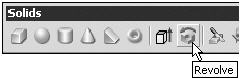
The Revolve tool can be called either with a click on its tool icon in the Solids toolbar (Fig. 13.17), or by a click on its name in the Solids sub-menu of the Draw drop-down menu, or by entering revolve, or its abbreviation rev, at the command line.


Fig. 13.17: The Revolve tool icon from the Solids toolbar

UNLIMITED FREE
ACCESS
TO THE WORLD'S BEST IDEAS

SUBMIT
Already a GlobalSpec user? Log in.

This is embarrasing...

An error occurred while processing the form. Please try again in a few minutes.

Customize Your GlobalSpec Experience

Category: Satellites
Finish!
Privacy Policy

This is embarrasing...

An error occurred while processing the form. Please try again in a few minutes.