Introduction to AutoCAD 2006 2D and 3D Design

Chapter 21: Internet Tools

Aim of this chapter

The purpose of this chapter is to introduce the tools which are available in AutoCAD 2006, which make use of facilities available on the World Wide Web .

Emailing drawings

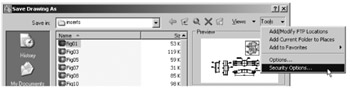
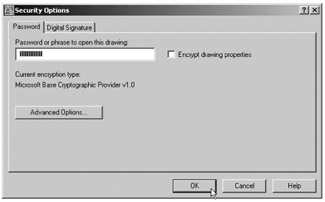
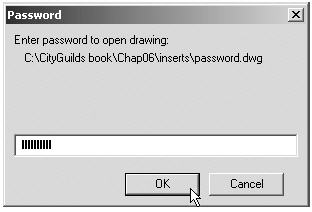
As with any other files which are composed of data, AutoCAD drawings can be sent by email as attachments. If a problem of security of the drawings is involved, they can be encapsulated with a password as the drawings are saved prior to being attached in an email. To encrypt a drawing with a password, click Tools in the Save Drawing As dialog and from the popup list which appears click Security Options . . . (Fig. 21.1). Then in the Security Options dialog which appears (Fig. 21.2) enter a password in the Password or phrase to open this drawing field, followed by a click on the OK button. The drawing then cannot be opened until the password is entered in the Password dialog (Fig. 21.3) which appears when an attempt is made to open the drawing by the person receiving the email.


Fig. 21.1: Selecting Security Options . . . in the Save Drawing As dialog

Fig. 21.2: Entering a password in the Security Options dialog

Fig. 21.3: The Password dialog appearing when a password-encrypted drawing is about to be opened

There are many reasons why drawings may require to be password encapsulated in order to...

UNLIMITED FREE
ACCESS
TO THE WORLD'S BEST IDEAS

SUBMIT
Already a GlobalSpec user? Log in.

This is embarrasing...

An error occurred while processing the form. Please try again in a few minutes.

Customize Your GlobalSpec Experience

Category: Drawing Software
Finish!
Privacy Policy

This is embarrasing...

An error occurred while processing the form. Please try again in a few minutes.