Introduction to AutoCAD 2006 2D and 3D Design

Chapter 10: Other Types of File Format

Aims of this chapter

  1. To introduce Object Linking and Embedding ( OLE) and its uses.

  2. To introduce the use of Encapsulated Postscript ( EPS) files.

  3. To introduce the use of Data Exchange Format ( DXF) files.

  4. To introduce raster files.

  5. To introduce Xrefs.

Object linking and embedding

First example copying and pasting (Fig. 10.3)

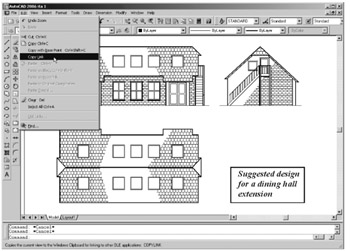
  1. Open any drawing in the AutoCAD 2006 window (Fig. 10.1).


    Fig. 10.1: A drawing in the AutoCAD 2006 window showing Copy Link selected from the Edit drop-down menu

  2. Left-click Copy Link in the Edit drop-down menu (Fig. 10.1).

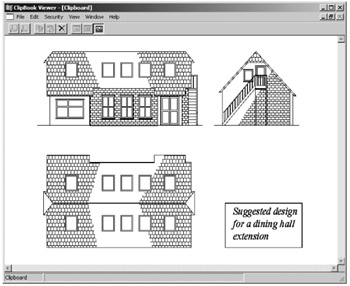
  3. Click the AutoCAD 2006 Minimize button and open the Clipboard viewer. The copied drawing appears in the clipboard (Fig. 10.2).


    Fig. 10.2: The drawing from AutoCAD copied to the Clipboard

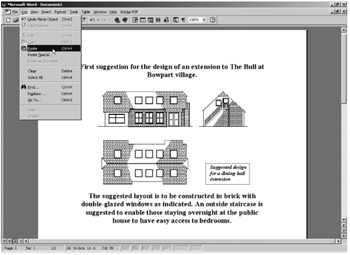
  4. Open Microsoft Word and click on Paste in the Edit drop-down menu (Fig. 10.3). The drawing from the Clipboard appears in the Microsoft Word document (Fig. 10.3).


    Fig. 10.3: Example copying and pasting

  5. Add text as required.

Note

  1. It is not common practice to have a Clipboard window showing on screen. The Clipboard usually works in the background and thus it is not normal practice for it to be seen. It is shown opened here to display its use in acting as an agent for transposing drawings etc. from one application to another.

  2. Similar results can be obtained using the Copy and Copy with Base Point tools from the...

UNLIMITED FREE
ACCESS
TO THE WORLD'S BEST IDEAS

SUBMIT
Already a GlobalSpec user? Log in.

This is embarrasing...

An error occurred while processing the form. Please try again in a few minutes.

Customize Your GlobalSpec Experience

Category: Computer-Aided Design (CAD) Services
Finish!
Privacy Policy

This is embarrasing...

An error occurred while processing the form. Please try again in a few minutes.