Planning Using Primavera Project Planner P3 Version 3.1 Revised 2006
Chapter 9: Organizing Activities

Overview

Projects may be organized by Activity Codes and many other Activity Data Items such as resources, dates, float, percentages, predecessors and successors. Reorganize automatically will move activities under their correct group headings each time data is changed. When you are assigning Activity Codes, it is recommended that you switch this facility off so the activities do not move around as you assign their codes.

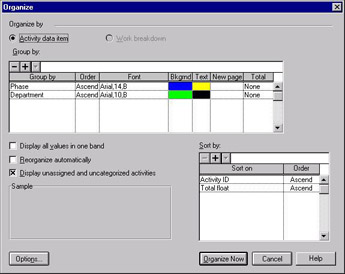
To organize activities select Format organize or click the button on the toolbar:

  • Select the Activity data item radio button at the top of the form.

  • In the upper window click on the button to create or the button to delete a Grouping. Each grouping automatically produces a heading or band separating the activities that belong to this group from the others.

  • Use Order, Font, Background and Text to format the headings.

  • New Page creates a page break at each new group code when printing.

  • Total is used to place a total at the top or bottom of a group. Values and Quantities are totaled. Dates are calculated (early dates are the earliest of the early date and the late dates are the latest of the late dates) and a summary bar produced.

  • When Reorganize automatically is switched off you may reorganize the activities after assigning or changing Activity Codes by pressing F5 or selecting Format, Reorganize or clicking the button on the toolbar.

  • Display unassigned and...

UNLIMITED FREE
ACCESS
TO THE WORLD'S BEST IDEAS

SUBMIT
Already a GlobalSpec user? Log in.

This is embarrasing...

An error occurred while processing the form. Please try again in a few minutes.

Customize Your GlobalSpec Experience

Category: Standards and Technical Documents
Finish!
Privacy Policy

This is embarrasing...

An error occurred while processing the form. Please try again in a few minutes.