Planning Using Primavera Project Planner P3 Version 3.1 Revised 2006
Chapter 15: Scheduling Options and Out of Sequence Progress

Overview

Scheduling Options allow you to decide how P3 calculates and displays the following date and duration information:

  • Automatic scheduling and Leveling

  • Out of sequence progress

  • Start to Start Lag

  • Activity Durations with Finish to Finish relationships

  • Open Ends, activities without successors

  • Total Float Calculations for Interruptible Scheduling and Hammocks

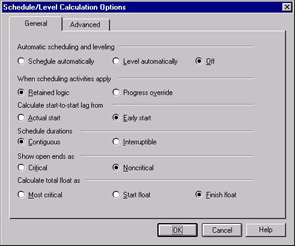
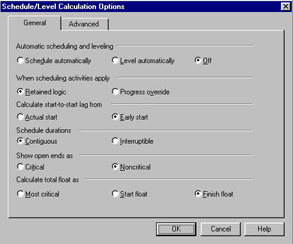
Select Tools, Schedule, Options to open the Scheduling/Level Calculations Options form:

15.1 Automatic Scheduling and Leveling

P3 has an Automatic Scheduling and Leveling Option. The project will be scheduled and/or leveled as appropriate when data is changed.

Select Tools, Schedule, Options icon to open the Schedule/Level Calculations Options form:

  • Select Off and P3 will only schedule when you press F9, select Tools, Schedule, Schedule Now or click on the icon on the Tool Bar.

  • Select Schedule automatically and P3 will schedule each time data that affects that timing, such as durations, constraints and logic, is changed.

  • Select Level automatically and P3 will level the schedule each time you make changes to resources and recalculate the schedule.

15.2 Out-of-Sequence Progress

Out of Sequence Progress decides how original logic applies to the remaining work of a partially completed activity with an incomplete predecessor.

There are two options for calculating this relationship in P3:

  • Retained Logic and

  • Progress Override.

Retained Logic

The diagram below shows the effect of selecting Retained logic. The remaining work on the activity is scheduled to be completed after the predecessor.

UNLIMITED FREE
ACCESS
TO THE WORLD'S BEST IDEAS

SUBMIT
Already a GlobalSpec user? Log in.

This is embarrasing...

An error occurred while processing the form. Please try again in a few minutes.

Customize Your GlobalSpec Experience

Category: Project Management Services
Finish!
Privacy Policy

This is embarrasing...

An error occurred while processing the form. Please try again in a few minutes.