Planning Using Primavera Project Planner P3 Version 3.1 Revised 2006
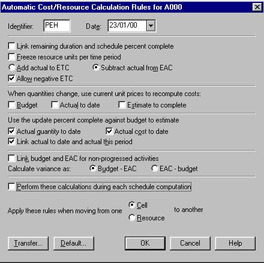
P3 has Autocost Rules that allow the scheduler to decide how costs and quantities are calculated. These should be reviewed before statusing the schedule for the first time as their values often need to be different from those used when creating the initial schedule.
It is important that these options are understood. They are well defined in P3 Help and the descriptions are self-explanatory.
Select Tools, Options, Autocost Rules to access the Autocost form.

Identifier and Dates are text boxes you may complete, but have no other purpose.
Transfer allows you to transfer rules from another project.
Default reassigns the default Autocost Rules to your project. When a project is created it adopts the default Autocost Rules. You may set your default Autocost rules by closing all projects and selecting Tools, Options, Default Autocost Rules to open the Global Automating Cost/Resource Calculation Rules.