Planning Using Primavera Project Planner P3 Version 3.1 Revised 2006

Chapter 11: Constraints

Overview

Constraints are used to impose logic on activities that cannot be realistically scheduled with logic links. This chapter covers in detail four constraints:

  • Start constraint Early

  • Finish constraint Late

  • Expected finish and

  • Float constraint As late as possible.

Early Constraints operate on the Early Dates and Late Constraints operate on Late Dates.

These are the minimum number of constraints that you will require to make your schedule work.

Start constraint Early, also known as Start no Earlier Than constraint, is used when the start date of an activity is known or known approximately. P3 will not allow the activity s early start to be prior this date.

Finish Constraint Late, also known as Finish no Later constraint, is used when the latest finish date is stipulated. P3 will not allow the activity s late finish to be after this date.

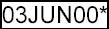
A date with a constraint will be displayed with an asterisk. E.g. . The asterisk for and Early Constraints will only be displayed in the Early date column and Late Constraints in the Late date column.

Expected Finish, is used to calculate the remaining duration for you. P3 will calculate the remaining duration as the number of working days left between the start date (data date if in progress) and the expected finish.

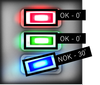
The Remaining duration of an activity assigned with an Expected Finish constraint will be displayed with an asterisk. E.g. .

Float constraint As...

UNLIMITED FREE
ACCESS
TO THE WORLD'S BEST IDEAS

SUBMIT
Already a GlobalSpec user? Log in.

This is embarrasing...

An error occurred while processing the form. Please try again in a few minutes.

Customize Your GlobalSpec Experience

Category: Billing Software
Finish!
Privacy Policy

This is embarrasing...

An error occurred while processing the form. Please try again in a few minutes.