Planning Using Primavera Project Planner P3 Version 3.1 Revised 2006

19.2: Understanding the Data Date

19.2 Understanding the Data Date

The Data Date is also known as Review Date, Status Date, As Of Date and Update Date.

  • The Data Date is the date that divides past and future in the schedule.

  • Actual Costs and Quantities/Hours should have occurred before the data date.

  • Costs and Quantities/Hours To Complete occur after the data date.

  • Remaining durations are calculated from the Data Date.

  • The Data Date is not normally in the future, but often in the recent past, due to the time it may take to collect the information to status the schedule.

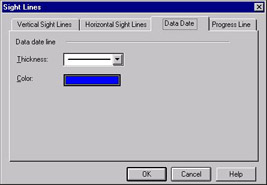
To modify the Data Date color select Format, Sight Lines to open the Sight Lines form and select the Data Date tab.

UNLIMITED FREE
ACCESS
TO THE WORLD'S BEST IDEAS

SUBMIT
Already a GlobalSpec user? Log in.

This is embarrasing...

An error occurred while processing the form. Please try again in a few minutes.

Customize Your GlobalSpec Experience

Category: Supplier Relationship Management Software (SRM)
Finish!
Privacy Policy

This is embarrasing...

An error occurred while processing the form. Please try again in a few minutes.