Planning Using Primavera Project Planner P3 Version 3.1 Revised 2006
19.1: Understanding Target Schedule and Budgets

19.1 Understanding Target Schedule and Budgets

Budgets

The Budget hours or quantities and costs of resources are automatically recorded in the Budget field of each resource as the resource is assigned to an activity.

Targets

A Target Schedule is a complete schedule against which your progress and performance is measured. Setting the Target schedule is covered in the TRACKING PROGRESS chapter.

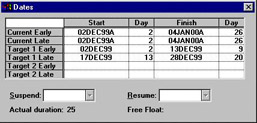
Target dates may be viewed by the following methods:

  • Display the Target start and finish date columns

  • Display the Target Bar in the bars chart area or

  • Display the Dates form from View, Activity Detail, Dates.

There are two distinct processes when statusing a schedule:

  • Statusing the dates then

  • Statusing the resources, costs and quantities.

There are relationships between resources and the percent complete that may be created or broken and are governed by Autocost Rules. These rules must be understood to successfully status a resourced schedule. They are not easy to comprehend but these rules are a feature that makes P3 a good scheduling tool.

UNLIMITED FREE
ACCESS
TO THE WORLD'S BEST IDEAS

SUBMIT
Already a GlobalSpec user? Log in.

This is embarrasing...

An error occurred while processing the form. Please try again in a few minutes.

Customize Your GlobalSpec Experience

Category: Project Management Services
Finish!
Privacy Policy

This is embarrasing...

An error occurred while processing the form. Please try again in a few minutes.