Planning Using Primavera Project Planner P3 Version 3.1 Revised 2006
Chapter 10: Adding the Logic

Overview

The next phase of a schedule is to add the logic to the activities. There are two types of logic that you must understand:

  • The first is the logic links or relationships between activities and

  • The second is the imposed constraints on the activities.

10.1 Understanding Relationships

There are four types of relationships available in P3; they are Finish-to-Start ( FS) (also known as conventional), Start-to-Start ( SS), Start-to-Finish ( SF) and Finish-to-Finish ( FF).

Two other terms you must understand are:

  • Predecessor, an activity that controls the start or finish of another activity, and

  • Successor, an activity whose start or finish depends on the start or finish of another activity.

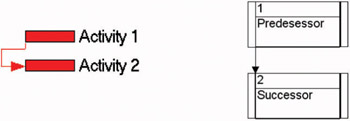
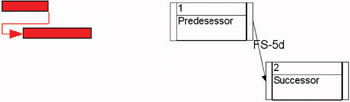
If you were to draw a FS relationship (or conventional) it would look like this:

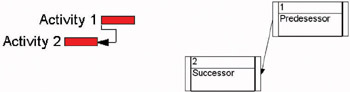
While the SS relationship looks like this:

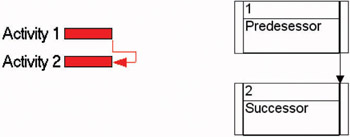
The SF relationship looks like:

The FF relationship would be:

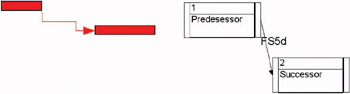
An example of a FS with positive lag:

and an example with negative lag:

Lag is calculated on the predecessor's calendar.

Important You must be careful when using a lag to allow for delays such as curing concrete when the predecessor is not a seven-day calendar. The concrete will cure while the predecessor calendar has non-work days.

10.2 Adding Relationships to the Activities

There are a number of methods for adding logic to activities. This chapter will look at the following techniques:

  • Graphical adding, editing and deleting relationships,

  • Series Link and Unlink,

  • Successor and...

UNLIMITED FREE
ACCESS
TO THE WORLD'S BEST IDEAS

SUBMIT
Already a GlobalSpec user? Log in.

This is embarrasing...

An error occurred while processing the form. Please try again in a few minutes.

Customize Your GlobalSpec Experience

Category: Supplier Relationship Management Software (SRM)
Finish!
Privacy Policy

This is embarrasing...

An error occurred while processing the form. Please try again in a few minutes.