Adobe Photoshop CS2 A - Z: Tools and Features Illustrated Ready Reference
C: Cache, Bridge Cutout filter

Cache, Bridge Camera Raw Done

Cache, Bridge

  • Menu: Bridge: Tools>Cache

  • Shortcut:

  • Version: CS2

  • See also: Bridge

The cache in the Bridge application is a portion of hard disk memory that is used to store thumbnail, metadata and file information. Caching these details means that loading times for folders and files that have already been displayed are much shorter.

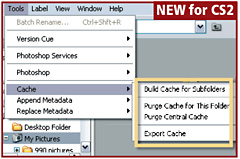
Caches are built for specific folders when the contents are first displayed in Bridge. Alternatively the cache building process can occur before display by selecting the folder and then choosing Tools>Cache>Build Cache for Subfolders. This action speeds up the display of the contents in the subfolders when they are first viewed.

Pro s Tip

When copying images to a CD or DVD the cache for the files can be added to the disk to help speed up display when the photos are first viewed. If you have selected the Use A Centralized Cache File in the Preferences dialog then to include the cache data in the picture folder you will need to select the Tools>Cache>Export Cache option before copying the folder to CD or DVD.

Two purge options are also available in the Tools>Cache Menu.

Purge Cache for this Folder clears the memory of the data saved for the folder selected. This is a good option for removing a corrupted cache and then rebuilding a new one.

Purge Central Cache deletes the whole centralized cache freeing up space on the hard drive.

Calculations

  • Menu: Image>Calculations

  • Shortcut:

UNLIMITED FREE
ACCESS
TO THE WORLD'S BEST IDEAS

SUBMIT
Already a GlobalSpec user? Log in.

This is embarrasing...

An error occurred while processing the form. Please try again in a few minutes.

Customize Your GlobalSpec Experience

Category: Video and Audio Software
Finish!
Privacy Policy

This is embarrasing...

An error occurred while processing the form. Please try again in a few minutes.