Adobe Photoshop CS2 A - Z: Tools and Features Illustrated Ready Reference
Menu:
Shortcut:
Version: 6.0, 7.0, CS, CS2
See also: Blend modes
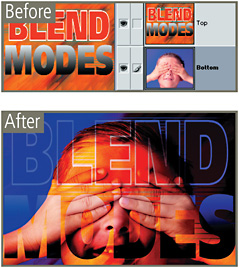
The Color Burn blending mode is one of the group of modes that darkens the picture. Here when the upper layer is changed to the Color Burn mode its content is used to darken the bottom layer and in the process mirror the color of the upper layer.

Blending with a white upper layer produces no change.
Menu:
Shortcut:
Version: 6.0, 7.0, CS, CS2
See also: Color Balance, Variations, Auto Color Correction, Auto Levels
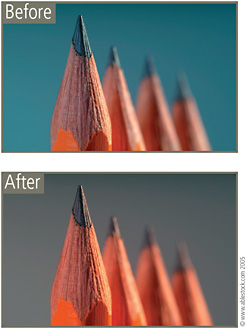
Photographing under a range of mixed lighting conditions can cause your pictures to have a strange color cast. There are several Photoshop tools that can be used to remove this tint from your photos.

The Auto Color and Auto Levels options both attempt to redistribute the colors and, in the case of Levels the tones as well, to achieve a neutral result. As with most automatic options there will be occasions when this approach works well and times when the results are not all you expect. If this occurs select Edit>Undo to reverse the changes applied and then try another cast removal approach.
For a more manual approach, both the Color Balance and Variations features allow incremental color changes to specific tonal areas (shadow, midtones, highlights) of the picture.
Menu: Image>Mode
Shortcut: