Adobe Photoshop CS2 A - Z: Tools and Features Illustrated Ready Reference
T: Text Type Masks

Text Tile

Text

  • Menu:

  • Shortcut:

  • Version: 6.0, 7.0, CS, CS2

  • See also: Type

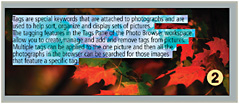
Text is often used interchangeably with Type to indicate the Photoshop tool used for combining letters, words, sentences and phrases with your photos and illustrations (2).

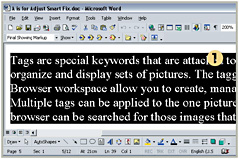
Blocks of text can be selected in other programs, such as Microsoft Word (1), copied and then pasted into a Photoshop picture as a new Type layer.

Text on a Path

  • Menu:

  • Shortcut:

  • Version: CS2

  • See also: Type

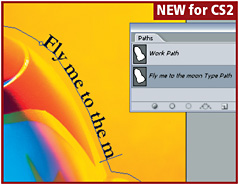
Adding type to a path is a new feature for Photoshop but it is one that should be familiar to users of DTP or illustration packages.

Start by creating a path in the shape that you want the text to follow. Make sure that the path is active in Paths palette. Next select the Type tool from the Photoshop toolbar and position the tool s pointer so that it is over the path. The pointer (cursor) will change to the Type on a Path pointer. Click to set a starting point and then input your text.

If you have selected the Horizontal Type tool the letter shapes will be placed at right angels to the path. Using the Vertical Type tool will straddle the letter shapes along the path.

Texture Fill filter

  • Menu: Filter>Render>Texture Fill

  • Shortcut:

  • Version: 6.0, 7.0, CS, CS2

  • See also: Filters

The Texture Fill filter, as one of the group of Render filters, fills a layer or picture by seamlessly...

UNLIMITED FREE
ACCESS
TO THE WORLD'S BEST IDEAS

SUBMIT
Already a GlobalSpec user? Log in.

This is embarrasing...

An error occurred while processing the form. Please try again in a few minutes.

Customize Your GlobalSpec Experience

Category: UV Cameras
Finish!
Privacy Policy

This is embarrasing...

An error occurred while processing the form. Please try again in a few minutes.