Adobe Photoshop CS2 A - Z: Tools and Features Illustrated Ready Reference
Menu: Image > Mode > Duotone
Shortcut:
Version: 6.0, 7.0, CS, CS2
See also: Duotone
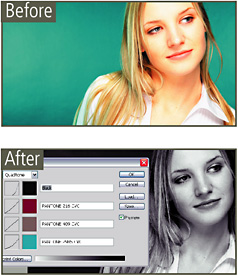
Ouadtones, like Duotones and Tritones, are grayscale images that use process or Pantone colors to give a subtle color tint to monochrome pictures.
The results are almost like the sepia, blue and gold toning of the conventional darkroom but with much more control and repeatability.

Photoshop has a selection of preset Ouadtones in the Duotone folder found in the Preset folder.
Menu:
Shortcut: Q
Version: 6.0, 7.0, CS, CS2
See also: Masks
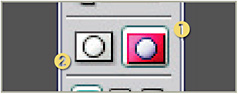
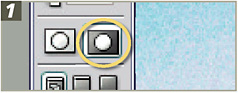
The Quick Mask mode is a great way for isolating areas that you don t want to be altered with editing and enhancement activities. Enter this mode by clicking on the icon near the bottom of the toolbar (1). It s a quick way to create a mask around a section. The mask can be increased using one of the Painting tools or decreased using the Eraser.

When you ve made all your adjustments to the mask, click the off icon at the base of the toolbar to return to the standard editing mode and a selection will appear on the edges where the mask meets the unmasked area.
Switch back to the Standard Mode (selection mode) by clicking the button at the bottom of the toolbox (2). The non-masked areas will now be selected ready for adjustments.