Adobe Photoshop CS2 A - Z: Tools and Features Illustrated Ready Reference
Copy command Custom color table

Copy command

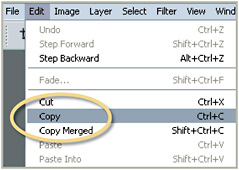
  • Menu: Edit>Copy

  • Shortcut: Ctrl/Cmd C

  • Version: 6.0, 7.0, CS, CS2

  • See also: Copy Merged command, Paste command

Just like other computer software (word processing and spreadsheet software) Photoshop contains the standard Copy and Paste commands.

Located under the Edit menu, the Copy option duplicates the contents of the picture parts in the current selection and stores it in the Clipboard memory of the computer.

Copying is usually the first step in the process; the next action is usually to paste the picture part into the same or a new document. This step is handled by the Edit>Paste command.

Copy Merged command

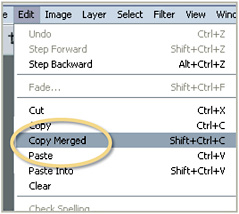
  • Menu: Edit>Copy Merged

  • Shortcut: Ctrl/Cmd Shft C

  • Version: 6.0, 7.0, CS, CS2

  • See also: Copy command, Paste command

Just like the Copy command, the Copy Merged option copies the contents of a selection, but the difference is that this command also copies and merges the content of all the layers in the document.

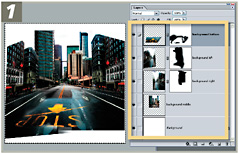
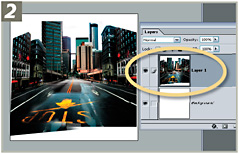
This feature is particularly helpful for creating a single layer copy of a multilayered composition but without merging or flattening the original.

To make a single layer copy of the content of a multi-layered Photoshop document without flattening or merging start by selecting the whole canvas area using Select>All.

Now copy the merged layers using Edit>Copy Merged and then create a new document the size of the copied layers with File>New>Blank File and paste down the merged copy using Edit>Paste.

Craquelure filter

UNLIMITED FREE
ACCESS
TO THE WORLD'S BEST IDEAS

SUBMIT
Already a GlobalSpec user? Log in.

This is embarrasing...

An error occurred while processing the form. Please try again in a few minutes.

Customize Your GlobalSpec Experience

Category: Authoring and Publishing Software
Finish!
Privacy Policy

This is embarrasing...

An error occurred while processing the form. Please try again in a few minutes.