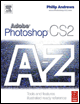
Adobe Photoshop CS2 A - Z: Tools and Features Illustrated Ready Reference
Z: ZigZag filter ZoomViwe format

ZigZag filter ZoomView format

ZigZag filter

  • Menu: Filter>Distort>ZigZag

  • Shortcut:

  • Version: 6.0, 7.0, CS, CS2

  • See also: Filters

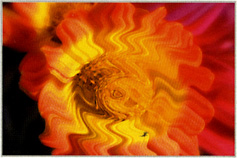
The ZigZag filter, as one of the group of Distort filters, simulates up and down waves such as pond ripples.

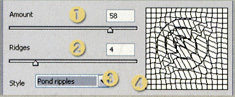
The dialog contains controls that adjust the style and intensity of the effect. The Amount slider (1) alters the strength of the ripple effect, which basically translates to the depth and height of the resultant waves. Low values create shallower, more subtle effects, higher numbers produce more dramatic results.

The Ridges slider (2) increases or decreases the number of ridges used in the effect.

Three different types of ZigZag filtration are available from the drop-down Style menu (3) Pond ripples, Out from the center and Around the center.

Also included is a simulated preview window, where the filter is applied to a wire frame representation of your picture (4).

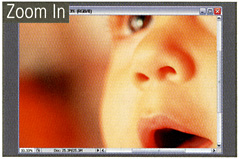
Zoom In/Zoom Out

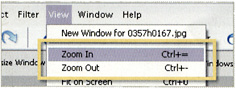
  • Menu: View>Zoom In/Zoom Out

  • Shortcut: Ctrl/Cmd = Ctrl/Cmd.

  • Version: 6.0, 7.0, CS, CS2

  • See also: Zoom tool, Navigator

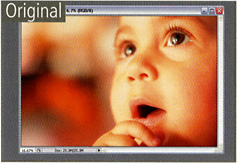
The View>Zoom In/Zoom out menu options magnify and reduce the size of the onscreen image in a way that is similar to the Zoom tool.

Each selection of the menu item (or keystroke combination) changes the magnification of the image by set increments between a minimum of 1 pixel (usually less than 1%) and a maximum of 1600%.

Zoom tool

  • Menu:

  • Shortcut: Z

  • Version: 6.0, 7.0, CS, CS2

  • See also: Match Zoom, Navigator

UNLIMITED FREE
ACCESS
TO THE WORLD'S BEST IDEAS

SUBMIT
Already a GlobalSpec user? Log in.

This is embarrasing...

An error occurred while processing the form. Please try again in a few minutes.

Customize Your GlobalSpec Experience

Category: Camera Lenses and Video Lenses
Finish!
Privacy Policy

This is embarrasing...

An error occurred while processing the form. Please try again in a few minutes.