Adobe Photoshop CS2 A - Z: Tools and Features Illustrated Ready Reference
L: LAB color LZW compression

LAB color Layer, Group Layers

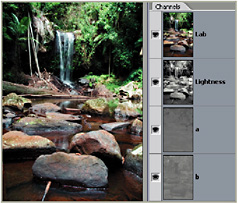
LAB color

  • Menu: Image>Mode>LAB

  • Shortcut:

  • Version: 6.0, 7.0, CS, CS2

  • See also: Color modes

An international standard for color measurements developed by the Commission Internationale de L Eclairage (CIE).

It s capable of reproducing all the colors of RGB and CMYK and uses three channels one for luminosity and the other two for RGB type color ranges.

Some users prefer to work in this mode as it s device independent and colors that fall into the CMYK gamut aren t changed when you convert to CMYK.

Label files Bridge

  • Menu: Bridge: Label

  • Shortcut: Ctrl/Cmd 0 9

  • Version: CS2

  • See also: Rate files

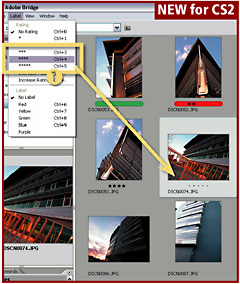
One of the many ways that you can organise the files that are displayed in the Bridge workspace is by attributing a label to the picture.

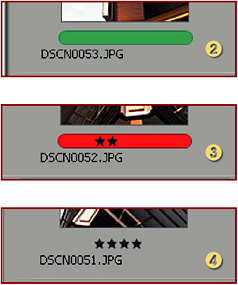
In CS2 the labels option is supplied in two forms a color tag, called Label (2) or star rating, called Rating (4). Either or both (3) label types can be applied to any picture.

Labels are attached by selecting the thumbnail(s) in the workspace and then choosing the desired label from the list under the Label menu (1). Keyboard shortcuts are also provided for each label option making it possible to quickly apply a label to a thumbnail or group of thumbnails. The label tag can then be used to sort or locate individual pictures from groups of photos.

Lasso tools

  • Menu:

  • Shortcut: L

  • Version: 6.0, 7.0, CS, CS2

  • See also: Polygonal...

UNLIMITED FREE
ACCESS
TO THE WORLD'S BEST IDEAS

SUBMIT
Already a GlobalSpec user? Log in.

This is embarrasing...

An error occurred while processing the form. Please try again in a few minutes.

Customize Your GlobalSpec Experience

Category: Label Printers
Finish!
Privacy Policy

This is embarrasing...

An error occurred while processing the form. Please try again in a few minutes.