Adobe Photoshop CS2 A - Z: Tools and Features Illustrated Ready Reference
F: Facet Filter Fuzziness Setting

Facet Filter File Format

Facet Filter

  • Menu: Filter>Pixelate>Facet

  • Shortcut:

  • Version: 6.0, 7.0, CS, CS2

  • See also: Filters

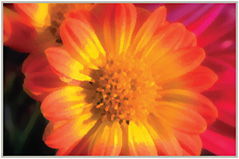
The Facet filter, as one of the group of Pixelate filters, simulates the look of a hand-worked painting by recreating the photo with blocks of color.

The filter contains no controls to alter the strength or appearance of the effect. Some changes in end results are possible by altering the image size before applying the filter. The filtering process produces more dramatic results when applied to low resolution files than when used with pictures with large pixel dimensions.

As the filter doesn t have an image preview option it may be necessary to filter the picture several times with different resolution settings before deciding on the best values to use. Use Edit>Undo to reverse the last filter change.

Fade Command

  • Menu: Edit>Fade

  • Shortcut: Ctrl/Cmd Shft F

  • Version: 6.0, 7.0, CS, CS2

  • See also: Undo

The Fade command allows any filter or color change to be reduced in strength using this fade control.

In its standard mode the slider in the feature gradually applies (or takes away) the filter s effect. Another approach is to use the Fade option in conjunction with a Blend mode selection (also included in the dialog) making the filter appear as though it s on a separate layer to give a completely different feel. Definitely one to experiment with.

The Fade command moved to the Edit menu on version 6.0. Version 5.5 users will find...

UNLIMITED FREE
ACCESS
TO THE WORLD'S BEST IDEAS

SUBMIT
Already a GlobalSpec user? Log in.

This is embarrasing...

An error occurred while processing the form. Please try again in a few minutes.

Customize Your GlobalSpec Experience

Category: Camera Filters
Finish!
Privacy Policy

This is embarrasing...

An error occurred while processing the form. Please try again in a few minutes.