Adobe Photoshop CS2 A - Z: Tools and Features Illustrated Ready Reference
E: Edges Fade Command

Edges Equalize

Edges

  • Menu:

  • Shortcut:

  • Version: 6.0, 7.0, CS, CS2

  • See also:

An edge is formed where adjacent pixels have high contrasting values. Photoshop has a number of filters that detect these and apply contrast reducing or increasing effects to soften or sharpen the image accordingly.

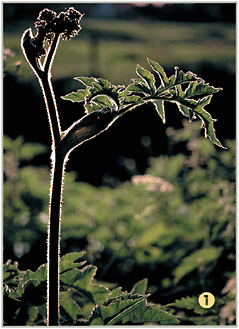
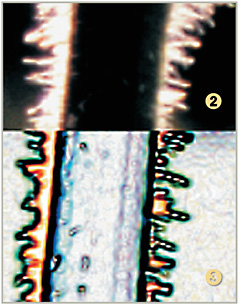
The top half of the picture (2) is an enlarged part of the stem of the plant in the picture above (1).

The Find Edges filter picks up all the areas of edge contrast and produces an almost posterized version that highlights these edges (3).

Effects (styles)

  • Menu:

  • Shortcut:

  • Version: 6.0, 7.0, CS, CS2

  • See also: Scale, Layer Styles, Effects Hide All

Early on in the digital imaging revolution, users started to place visual effects like drop shadows or glowing edges on parts of their pictures.

With the release of later versions of Photoshop, these types of effects have become far more sophisticated and built-in features of the program. Now, it is possible to apply an effect like a drop shadow , or a bold outline, to the contents of a layer with the click of a single button. Some effects changes are applied to the layer contents, others create a new layer to store the effect.

In Photoshop these effects options are listed under the Layer>Layer Styles menu (1). Effects can be combined to produce some truly stunning and complex styles. Many example styles are supplied in Photoshop and are grouped in a single palette called Layer...

UNLIMITED FREE
ACCESS
TO THE WORLD'S BEST IDEAS

SUBMIT
Already a GlobalSpec user? Log in.

This is embarrasing...

An error occurred while processing the form. Please try again in a few minutes.

Customize Your GlobalSpec Experience

Category: Pressure Sensitive Safety Edges and Safety Bumpers
Finish!
Privacy Policy

This is embarrasing...

An error occurred while processing the form. Please try again in a few minutes.