Adobe Photoshop CS2 A - Z: Tools and Features Illustrated Ready Reference
Contact Sheet Convert to Profile

Contact Sheet

  • Menu: File>Automate>Contact Sheet II Bridge:Tools>Photoshop>Contact Sheet II

  • Shortcut:

  • Version: 6.0, 7.0, CS, CS2

  • See also: Automate

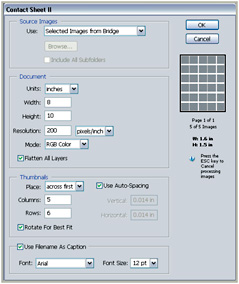
The Contact Sheet option creates a series of small thumbnail versions of all the images in a catalog or those that were multi-selected before opening the tool.

These small pictures are arranged on pages and can be labeled with filename caption. Once created it is an easy task to print a series of these contact sheets that can be kept as a permanent record of a folder s images. The job of selecting the best pictures to manipulate and print can then be made with hard copies of your photos without having to spend the time and money to output every image to be considered.

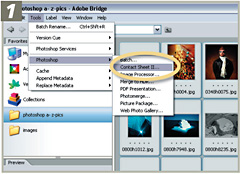
The feature can be accessed via the Tools>Photoshop options in Bridge or the Automate menu in Photoshop. Individual pictures can be multi-selected for inclusion in the feature when working via Bridge. In contrast, complete folders of photos are used when the feature is accessed from within Photoshop.

The options contained within the Contact Sheet dialog allow the user to select the number of columns of image thumbnails and the content of the text labels that are added. The page size and orientation can be chosen via the Page Setup button.

Multi-select the pictures from inside the Bridge. Then select Tools>Photoshop>Contact Sheet II. If Photoshop is not already opened the program will start and the Contact Sheet II dialog will...

UNLIMITED FREE
ACCESS
TO THE WORLD'S BEST IDEAS

SUBMIT
Already a GlobalSpec user? Log in.

This is embarrasing...

An error occurred while processing the form. Please try again in a few minutes.

Customize Your GlobalSpec Experience

Category: Press Brake Tooling
Finish!
Privacy Policy

This is embarrasing...

An error occurred while processing the form. Please try again in a few minutes.