Beginning AutoCAD 2006

Placing emphasis on learning by doing, this step-by-step guide provides a detailed exploration of AutoCAD functions required at each stage of producing a 2D drawing.
 TABLE OF CONTENTS
 These drawings commands will be discussed in turn using DEMODRG. The commands can be activated from the toolbar, menu bar or by keyboard entry and both co-ordinate entry and referencing existing objects (using OSNAP) will be demonstrated.
Open your C:\MYCAD\DEMODRG to display the squares, circles and object snap lines.
Erase the objects created during the object snap exercise.
Refer to Figure 9.1 and activated the Draw, Modify and Object Snap toolbars.
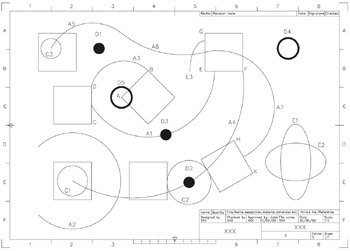
Figure 9.1: Creating arcs, donuts and ellipses using C:\MYCAD\WORKDRG.
There are 10 different arc creation methods.
Arcs are normally drawn in an anti-clockwise direction with combinations of the arc start point, end point, centre point, radius, included angle, length of arc, etc.
We will investigate four different arc creation methods as well as continuous arcs. You can try the others for yourself.
Center, Start, End
From the menu bar select Draw-Arc-Center, Start, End and:
| prompt | Specify center point of arc |
| respond | Snap to Intersection icon and pick point B |
| prompt | Specify start point of arc |
| respond | Snap to Midpoint icon and pick line CD |
| prompt | Specify end point of arc |
| respond | Snap to Nearest icon and pick a point on line EF |
| and | arc A1 created. |
Start, Center, Angle
Menu bar with Draw-Arc-Start, End, Angle and:
| prompt | Specify start point of arc |
| enter | 30,30 |
| prompt | Specify centre point of arc |
| respond | Snap to Centre icon and pick circle C1 |
| prompt | Specify included angle |
| enter | 270 |
| and | arc A2... |