Beginning AutoCAD 2006

Placing emphasis on learning by doing, this step-by-step guide provides a detailed exploration of AutoCAD functions required at each stage of producing a 2D drawing.
 TABLE OF CONTENTS
 Text should be added to a drawing whenever possible.
This text could simply be a title and date, but could also be a parts list, a company title block, notes on costing, customer data, etc.
AutoCAD 2006 allows the user to enter text:
as short entries, i.e. a single line or a few lines
as larger entries, i.e. several lines
via a table.
In this chapter we will consider the above text types as well as text fonts and styles, so:
Open your WORKDRG saved drawing and refer to Figure 13.1.
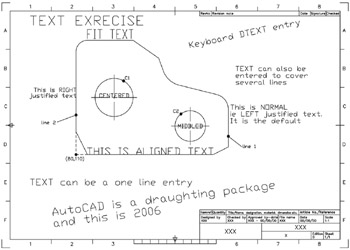
Figure 13.1: Adding text to WORKDRG.
The component should be positioned as displayed relative to the point (80,110).
Make layer TEXT current.








