Beginning AutoCAD 2006

Placing emphasis on learning by doing, this step-by-step guide provides a detailed exploration of AutoCAD functions required at each stage of producing a 2D drawing.
 TABLE OF CONTENTS
 A block is part of a drawing which is 'stored away' for future recall within the drawing in which it was created.
The block may be a nut, a diode, a tree, a house or any part of a drawing.
Blocks are used when repetitive copying of objects is required, but they have another important feature text can be attached to them.
This text addition to blocks is called attributes.
Block attribute text can be exported from an AutoCAD drawing as input to other software applications.
Remember the phrase ' within the drawing in which it was created'
We will refer to this statement in a later chapter.
Open the A3PAPER standard sheet and refer to Figure 28.1.
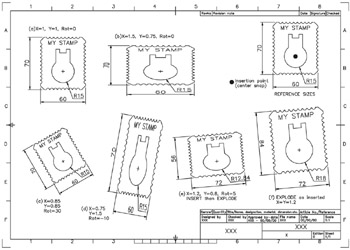
Figure 28.1: Creating and inserting a block.
Draw the stamp shape using the reference sizes given, or your own design, but with:
the outline on layer OUT
the stamp design on layer OUT but green (CHANGE command?)
a text item on layer TEXT
three dimensions on layer DIMS
remember to use your discretion for the design and any size not given.
Make layer OUT current.
At this stage save as C:\MYCAD\STAMP for future recall.
Blocks can be created from both the command line and via a dialogue box.
This first exercise will consider the keyboard entry method.
At the command line enter BLOCK
| prompt | Enter block name or [?] |
| enter | STAMP |
| prompt | Specify insertion base point |
| respond |