Beginning AutoCAD 2006

Placing emphasis on learning by doing, this step-by-step guide provides a detailed exploration of AutoCAD functions required at each stage of producing a 2D drawing.
 TABLE OF CONTENTS
 AutoCAD has both automatic and associative dimensioning, the terms meaning:
| when an object to be dimensioned is selected, the actual dimension text, arrows, extension lines, etc. are all added in one operation. |
| the arrows, extension lines, dimension text, etc. which 'make up' a dimension are treated as a single object. |
AutoCAD allows different 'types' of dimensions to be added to drawings. These are displayed in Figure 14.1 and can be categorised as:
Linear: horizontal, vertical and aligned
Baseline and Continue
Ordinate: both X-datum and Y-datum
Angular
Radial: diameter and radius
Leader: taking the dimension text 'outside' the object.
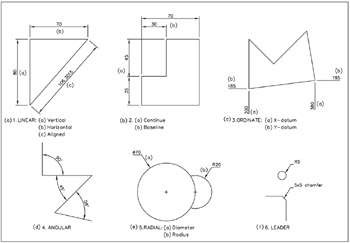
Figure 14.1: The AutoCAD dimension 'types'.
All dimensions used with AutoCAD objects have a terminology associated with them and it is important that the user has an understanding of this terminology.
The dimension terms used in AutoCAD, displayed in Figure 14.2, are:
The dimension and extension lines
These two features consist of:
the dimension line
the actual line
the dimension text arrowheads
extension lines
the extension line
an origin offset from the object
an extension beyond the line
spacing (for baseline)
Centre marking
Circular features can be displayed with either a mark, a line or nothing.
Dimension text
It is possible for the dimension text to:
have interior dimension line drawn or not drawn
display alternative units (i.e. imperial)
have a frame drawn around it.
Arrowheads
A selection of available arrowheads is displayed.
Dimension text alignment
The dimension...