Beginning AutoCAD 2006

Placing emphasis on learning by doing, this step-by-step guide provides a detailed exploration of AutoCAD functions required at each stage of producing a 2D drawing.
 TABLE OF CONTENTS
 In a previous chapter we investigated how dimensions could be customised to user requirements by setting and saving a dimension style.
The dimension style A3DIM was created and saved with our A3PAPER standard sheet.
In this chapter we will:
create and use several new dimension styles
add tolerance dimensions
investigate geometric tolerance
investigate dimension variables.
The process for creating new dimension styles involves altering the values for specific variables which control how the dimensions are displayed on the screen.
Dimensions can be displayed with tolerances and limits.
The formats available are symmetrical, deviation, limits and basic.
Figure 25.1(a) displays these formats along with the standard default dimension type, i.e. no tolerances displayed.
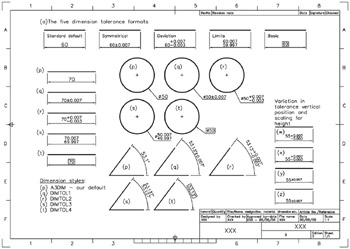
Figure 25.1: Dimension tolerance exercise.
To use tolerance dimensions correctly, a dimension style should be created for each 'type' which is to be used in the drawing. As usual we will investigate the topic with an exercise so:
Open your A3PAPER standard sheet and refer to Figure 25.1.
Draw a line, circle and angled lines and copy them to four other areas of the screen.
Dimension one set of objects with your standard A3DIM dimension style setting Figure 25.1(p).
Using the Dimension Style Manager dialogue box, create four new named dimension styles, all starting with A3DIM.
The four new style names are DIMTOL1, DIMTOL2, DIMTOL3 and DIMTOL4.
With the Dimension Style Manager dialogue box:
pick each new dimension style
pick Modify then select the:
Primary Units...