Beginning AutoCAD 2006

Placing emphasis on learning by doing, this step-by-step guide provides a detailed exploration of AutoCAD functions required at each stage of producing a 2D drawing.
 TABLE OF CONTENTS
 A table is an object containing data in rows and columns, the user:
creating and positioning the empty table
adding the content to the table cells.
All tables can:
contain three types of cell title, header and data
be created downwards or upwards
be customised with colour and text styles to user requirements.
Figure 24.1 displays:
the basic table terminology
a DOWN table with a title cell, 3 header cells and 6 data cells. All the text entries display the same text style
an UP table with a title cell, no header cells and 12 data cells. This table has been created using different text styles.
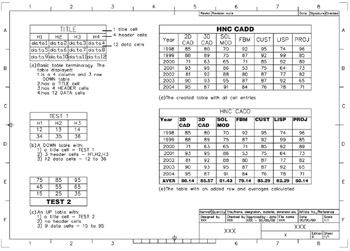
Figure 24.1: Table terminology and exercise.
Open your A3PAPER template file
We want to create a table to display a set of results for a CAD course from a well known college.
There are several topics offered in this course, including 2D draughting, 3D draughting, solid modelling, feature based modelling, customisation, LISP programming and a project.
It is the 'pass rates' for these topics over a 7-year period which have to be presented in both tabular and graphical form.
Make layer TEXT current and select from the menu bar Draw-Table and:
| prompt | Insert Table dialogue with three sections:
|
| respond | pick . . . at the Table Style name |
| prompt | Table Style dialogue box with Standard style listed |
| with |
|