Beginning AutoCAD 2006

Placing emphasis on learning by doing, this step-by-step guide provides a detailed exploration of AutoCAD functions required at each stage of producing a 2D drawing.
 TABLE OF CONTENTS
 All drawings created with AutoCAD:
are saved in named folders as a file
have a drive, folder name, file name and extension, e.g. C:\MYCAD\ACT1.dwg.
The file types used so far have had extensions:
.dwg
the standard file format for saving vector graphics
all AutoCAD drawings are saved with this extension.
.dwt
a drawing template file
has settings customised to user requirements
any drawing can be saved as a template file.
.dws
drawings standards file format
is used to define common properties and to compare inconsistencies between drawings.
Other file formats are available with AutoCAD and several of these will now be investigated.
Backup files have the extension .bak.
They are:
automatically created by AutoCAD when an opened drawing is saved with the same file name
are stored in the current folder with the drawing files
can be renamed (and then opened) as drawing (.dwg) files.
To rename a backup file:
open Windows Explorer (or similar) and navigate to your named folder
view the displayed icons as a detailed list
arrange the icons by type
scroll until the .bak files are displayed similar to Figure 36.1(a)
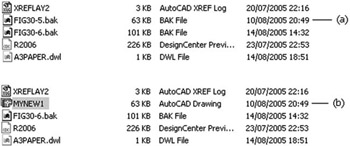
Figure 36.1: Renaming a backup file as a drawing file.
right-click any backup file name and:
| prompt | Shortcut menu |
| respond | pick Rename |
| prompt | text box placed around the selected file name |
| respond | enter the required name, e.g. MYNEW1.dwg then |
| and |
|
| respond | a double left-click on the renamed... |