Beginning AutoCAD 2006

Placing emphasis on learning by doing, this step-by-step guide provides a detailed exploration of AutoCAD functions required at each stage of producing a 2D drawing.
 TABLE OF CONTENTS
 AutoCAD has two drawing environments:
model space: to draw the component
paper space: to layout the drawing paper for plotting.
The two drawing environments are independent of each other and the concept is suitable for both 2D drawings and 3D modelling.
Until now:
all work has been completed in model space
we have had the facility to use paper space without being aware of this fact.
Notes
the user must realise that this chapter is an introduction to the model/paper space concept
paper space is particularly targeted for plotting and as I have no idea what type of plotter the reader has, I have assumed that no plotter is available. This does not affect any of the exercises
when the paper space environment is entered, a new icon will be displayed
the model space and paper space icons are shown in Figure 33.1
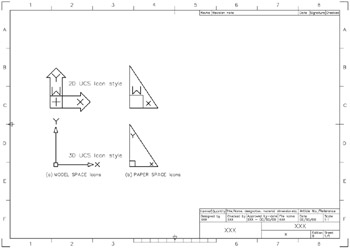
Figure 33.1: The model space and paper space icons.
the icon display is dependent on whether the UCS icon style has been set to 2D or 3D.
Before paper space can be used, the paper space environment must be activated by:
picking MODEL from the status bar
picking one of the layout tabs from the drawing screen
entering TILEMODE then 0 at the command line.
The A3PAPER standard sheet was created from an AutoCAD template file and has both the model and paper space environments active but we have only used the model environment for creating all drawing work.