Beginning AutoCAD 2006

Placing emphasis on learning by doing, this step-by-step guide provides a detailed exploration of AutoCAD functions required at each stage of producing a 2D drawing.
 TABLE OF CONTENTS
 Grips are an aid to the draughting process and offer the user access to a limited number of modify commands.
In an earlier chapter we 'turned grips off' with the command line entry of GRIPS 0.
This was to allow the user to become reasonably proficient with using the draw and modify commands.
Now that this has been achieved, we will investigate how grips are used.
Grips can be toggled on/off using:
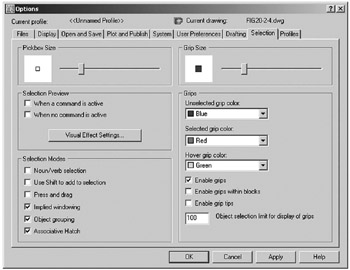
the Selection tab from the Options dialogue box
command line entry.
Open your A3PAPER standard sheet with layer OUT current.
From the menu bar select Tools-Options and:
| prompt | Options dialogue box |
| respond | pick Selection tab |
| prompt | Selection tab dialogue box |
| with | five distinct sections, two of which refer to grips:
|
| respond | refer to Figure 16.1 and:
|
| and | the drawing screen will be returned, with the grip box 'attached' to cursor cross-hairs. |
At the command line enter GRIPS
| prompt | Enter new value for GRIPS<1> |
| respond | |
The command entry to toggle grips on/off is GRIPS set to 1 are ON,...