Beginning AutoCAD 2006

Placing emphasis on learning by doing, this step-by-step guide provides a detailed exploration of AutoCAD functions required at each stage of producing a 2D drawing.
 TABLE OF CONTENTS
 A polyline is a single object which can consist of line and arc segments.
It can be drawn with varying widths.
It has it's own editing facility and can be activated by icon, from the menu bar or by keyboard entry.
A polyline is a very useful and powerful object yet it is probably one of the most under-used draw commands.
Persevere with the demonstration which follows, as it is quite long and requires several keyboard entries.
Open your A3PAPER standard file with layer OUT current and refer to Figure 20.1(a).
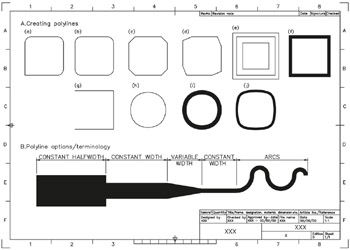
Figure 20.1: The polyline exercises.
Display the Draw, Modify, Object Snap and Modify II toolbars.
Select the POLYLINE icon from the Draw toolbar and:
| prompt | Specify start point |
| enter | 15,220 |
| prompt | Current line-width is 0.00 |
| then | Specify next point or [Arc//Halfwidth/Length/Undo/Width] |
| enter | @50,0 |
| prompt | Specify next point or [Arc/Close/Halfwidth/Length/Undo/ Width] |
| enter | @0,50 |
| prompt | Specify next point or . . . and enter @ 50,0 |
| prompt | Specify next point or . . . and enter @0, 50 |
| prompt | Specify next point or . . . |
| respond | right-click-enter to end command. |
From menu bar select Draw-Polyline and:
| prompt | Specify start point and enter 80,220 |
| prompt | Specify next point and enter @50<0 |
| prompt | Specify next point and enter 140,270 |
| prompt | Specify next point and enter @ 50,0 |
| prompt | Specify next point and enter |