Beginning AutoCAD 2006

Placing emphasis on learning by doing, this step-by-step guide provides a detailed exploration of AutoCAD functions required at each stage of producing a 2D drawing.
 TABLE OF CONTENTS
 Array is a command which allows multiple copying of objects in either:
a rectangular pattern
a circular (polar) pattern.
It is one of the most powerful and useful of the commands available, yet is one of the easiest to use.
Open the A3PAPER file with layer OUT current and the toolbars Draw, Modify and Object snap.
Refer to Figure 22.1 and draw the I-BEAM shape using the given reference sizes.
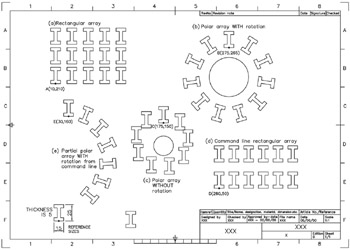
Figure 22.1: Using the ARRAY command.
Do NOT ADD the dimensions.
Multiple copy the I-BEAM shape from the point indicated to the points:
A(10,210), B(275,265), C(175,160), D(260,50) and E(30,160). Note that the donuts in Figure 22.1 are for reference only.
Draw two circles:
centre at 275,220 with radius 30
centre at 175,115 with radius 15.
Move the original I-BEAM shape to a 'safe place' on the screen.
Select the ARRAY icon from the Draw toolbar and:
| prompt | Array dialogue box |
| with |
|
| respond |
|
| prompt | Select objects at the command line |
| respond | window the shape at A then right-click |
| prompt | Array dialogue box |
| with | 12 objects selected and a preview display Figure 22.2 |
| prompt | pick OK. |
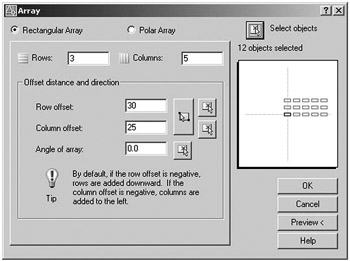
Figure 22.2: The dialogue box for the rectangular array.
The shape at A...