Beginning AutoCAD 2010: Exercise Workbook
After completing this lesson, you will be able to:
Draw an Inscribed or Circumscribed Polygon
Create an Ellipse using two different methods
Define an Elliptical Arc
Create Donuts
Define a Location with a Point
Select various Point Styles
Use 3 new Object Snap modes
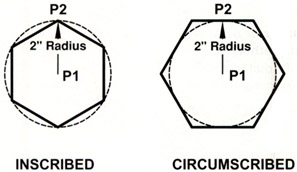
A polygon is an object with multiple edges (flat sides) of equal length. You may specify from 3 to 1024 sides. A polygon appears to be multiple lines but in fact it is one object. You can specify the center and a radius or the edge length. The radius size can be specified Inscribed) or Circumscribed.
Select the Polygon command using one of the following:
Ribbon = Home tab / Draw panel ? / ![]()
Keyboard = POL
The following prompts will appear on the command line:
_polygon Enter number of sides <4>: type number of sides < enter>
Specify center of polygon or [Edge]: specify the center location (P1)
Enter an option [Inscribed in circle/Circumscribed about circle]: type I or C
Specify radius of circle: type radius or locate with cursor. (P2)
| Note | The dashed circle is shown only as a reference to help you visualize the difference between Inscribed and Circumscribed. Notice that the radius is the same (2") but the Polygons are different sizes. Selecting Inscribed or Circumscribed is important. |

select the Polygon command using one of the options shown above.
The following prompts will...