Beginning AutoCAD 2010: Exercise Workbook
After completing this lesson, you will be able to:
Make an existing object larger or smaller proportionately
Stretch or compress an existing object.
Rotate an existing object to a specific angle.
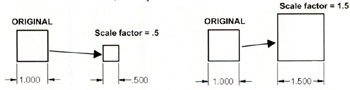
The SCALE command is used to make objects larger or smaller proportionately. You may scale using a scale factor or a reference length. You must also specify a base point. The base point is a stationary point from which the objects scale.
Select the SCALE command using one of the following:
Ribbon = Home tab / Modify panel / 
Keyboard = SCALE
Command: _scale
Select objects: select the object(s) to be scaled
Select objects: select more object(s) or
Specify base point: select the stationary point on the object
Specify scale factor or [Copy/Reference]: type the scale factor
If the scale factor is greater than 1, the objects will increase in size.
If the scale factor is less than 1, the objects will decrease in size.

Command: _scale
Select objects: select the object(s) to be scaled
Select objects: select more object(s) or
Specify base point: select the stationary point on the object
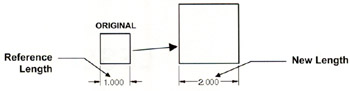
Specify scale factor or [Copy/Reference]: select Reference
Specify reference length <1>: specify a reference length
Specify new length: specify the new length

COPY option - creates a duplicate of the selected object. The duplicate is directly on top of the original. The duplicate will be scaled. The Original remains...