Beginning AutoCAD 2010: Exercise Workbook
To help you keep your focus in the "drawing area", AutoCAD has provided a command interface called Dynamic Input. You may input information within the Dynamic Input instead of on the command line.
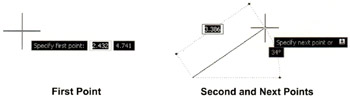
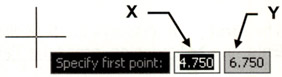
The First point displays the (Absolute: X, Y) distance from the Origin.
Enter the X dimension, press the Tab key, enter the Y dimension then
The Second and Next points display (Relative: Distance and Angle) from the last point entered. Enter the distance, press the tab key, enter the angle then

| Note | Some users find Dynamic Input useful some find it distracting. After completing this lesson you decide if you want to use it. It is your choice. |
Select the DYN button on the status bar or use the F12 key.
Pointer Input
Dimensional Input
Dynamic Prompts
You may control what is displayed by each component and turn each ON or OFF.
Refer to the following pages for more detailed descriptions.
Pointer Input is only displayed for the first point.
When Pointer Input is enabled (ON) and a command has been selected, the location of the crosshairs is displayed as coordinates in a tooltip near the cursor.
Example:
Select the LINE command.
Move the cursor.

The 2 boxes display the cursor location as X and Y coordinates from the Origin. (Absolute coordinates)
You may...