Beginning AutoCAD 2010: Exercise Workbook
After completing this lesson, you will be able to:
Understand the Polyline command
Draw a Polyline and a Polyarc
Assign widths to polylines
Set the Fill mode to On or Off.
Explode a Polyline
A POLYLINE is very similar to a LINE. It is created in the same way a line is drawn. It requires first and second endpoints. But a POLYLINE has additional features, as follows:
A POLYLINE is ONE object, even though it may have many segments.
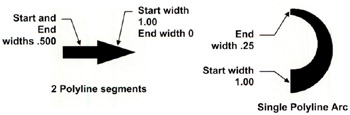
You may specify a specific width to each segment.
You may specify a different width to the start and end of a polyline segment.
Select the Polyline Command using one of the following:
Ribbon = Home tab / Draw panel / 
Keyboard = PL

Refer to the next page for more polyline options
OPTIONS:
Specify the starting and ending width.
You can create a tapered polyline by specifying different starting and ending widths.
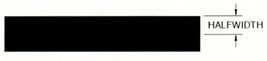
The same as Width except the starting and ending halfwidth specifies half the width rather than the entire width.

This option allows you to create a circular polyline less than 360 degrees. You may use (2) 180 degree arcs to form a full circular shape.
The close option is the same as in the Line command. Close attaches the last segment to the first segment.
This option allows you to draw a polyline at the same angle as the...