Beginning AutoCAD 2010: Exercise Workbook
After completing this lesson, you will be able to:
Edit the width of Polylines
Join Polylines
Convert Polylines to Curves
Convert a basic Line to a Polyline
Join Lines, Polylines, Arcs and Splines
The POLYEDIT command allows you to make changes to a polyline's option, such as the width. You can also change a regular line into a polyline and JOIN the segments.
Note: If you select a line that is NOT a POLYLINE , the prompt will ask if you would like to turn it into a POLYLINE.
Select the POLYEDIT command using one of the following:
Ribbon = Home tab / Modify ? panel / 
Keyboard = PE < enter>
Note: You may modify "Multiple" Polylines simultaneously.
PEDIT Select polyline or [Multiple]: select the polyline to be edited or "M"
Enter an option [Close/Join/Width/Edit vertex/Fit/Spline/Decurve/Ltypegen/Undo]: select an Option (descriptions of each are listed below.)
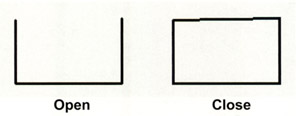
CLOSE connects the last segment with the first segment of an Open polyline. AutoCAD considers a polyline open unless you use the "Close" option to connect the segments originally.

OPEN removes the closing segment, but only if the CLOSE option was used to close the polyline originally.
OPTIONS:
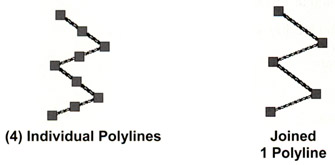
The JOIN option allows you to join individual polyline segments into one polyline. The segments must have matching endpoints.

The WIDTH option allows you to change the width of the polyline. But the entire polyline will have the same width.
This...