Beginning AutoCAD 2010: Exercise Workbook
Lesson 19

Learning Objectives

After completing this lesson, you will be able to:

  1. Create Multileaders

  2. Modify Multileader lines

  3. Create a New Multileader Style

  4. Dimension angular surfaces

  5. Add Special Characters

  6. Pre-assign a Prefix or Suffix to a dimension.

Multileader

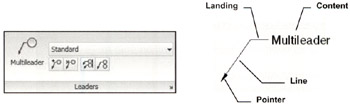
A multileader is a single object consisting of a pointer, line, landing and content. You may draw a multileader, Pointer first, tail first or content first.

To standard Multileader use:

Annotate tab / Leaders panel

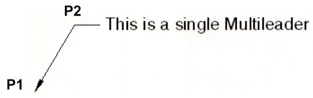
Create a Single Multileader

  1. Select the Multileader tool

    Command: _mleader

  2. Specify leader arrowhead location or [leader Landing first/Content first/Options] : specify arrowhead location (P1)

  3. Specify leader landing location: specify the landing location (P2)

  4. The Multitext editor appears. Enter text then select "Close Text Editor"

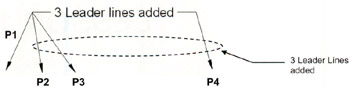
Add Leader Lines to Existing Multileader

  1. Select the Add Leader tool

  2. Select a multileader: click on the existing multileader line (P1)

  3. Specify leader arrowhead location: specify arrowhead location (P2)

  4. Specify leader arrowhead location: specify next arrowhead location (P3)

  5. Specify leader arrowhead location: specify next arrowhead location (P4)

  6. Specify leader arrowhead location: press to stop

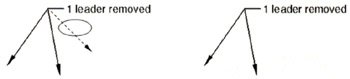
Remove a Leader Line from an Existing Multileader

  1. Select the Remove Leader tool

  2. Select a multileader: click anywhere on the existing multileader

  3. Specify leaders to remove: select the leader line to remove

  4. Specify leaders to remove: press to stop

Align Multileaders

  1. Select the Align Multileader tool

Command: _mleaderalign

  1. Select multileaders: select the leaders to align (Note 1 and Note 3)

  2. Select multileaders: press to stop selecting

    Current mode: Use current spacing

  3. Select multileader...

UNLIMITED FREE
ACCESS
TO THE WORLD'S BEST IDEAS

SUBMIT
Already a GlobalSpec user? Log in.

This is embarrasing...

An error occurred while processing the form. Please try again in a few minutes.

Customize Your GlobalSpec Experience

Category: EDM Machining Services
Finish!
Privacy Policy

This is embarrasing...

An error occurred while processing the form. Please try again in a few minutes.