Beginning AutoCAD 2010: Exercise Workbook
After completing this lesson, you will be able to:
Copy objects
Create a mirrored image
Add rounded corners
Add Chamfered corners
The COPY command creates a duplicate set of the objects selected.
The COPY command is similar to the MOVE command.
The steps required are:
Select the objects to be copied,
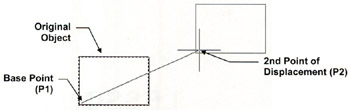
Select a base point
Select a New location for the New copy.
The difference between Copy and Move commands:
The Move command merely moves the objects to a new location.
The Copy command makes a copy and you select the location for the new copy.
Select the Copy command using one of the following commands:
Ribbon = Home tab / Modify panel / ![]()
Keyboard = CO
The following will appear on the command line:
Command: _copy
Select objects: select the objects you want to copy
Select objects: stop selecting objects by selecting
Current settings: Copy mode = Multiple
Specify base point or [Displacement/mOde]
Specify second point of displacement or
Specify second point or [Exit / Undo]

| Note | If you select the option mOde, you may select Single or Multiple copy mode. The default setting is Multiple. It is practical to leave the mode setting at Multiple. If you choose to make only... |