Beginning AutoCAD 2010: Exercise Workbook
After completing this lesson, you will be able to:
Understand Parametric drawing
Apply Geometric and Dimensional constraints
Control the display of constraints
Plot Dimensional constraints
Parametric drawing is a method of assigning a constraint to an object that is controlled by another object. For example, you could put a constraint on line #1 to always be parallel to line #2. Or you could put a constraint on diameter #1 to always be the same size as diameter #2. If you make a change to #1 AutoCAD automatically makes the change to #2 depending on which constraint has been assigned.
There are two general types of constraints:
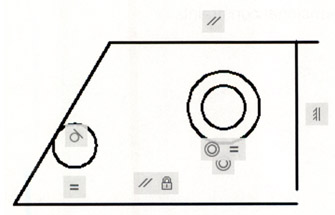
Geometric: Controls the relationship of objects with respect to each other. The Geometric constraints that will be discussed in this workbook are coincident, collinear, concentric, fix, parallel, perpendicular, horizontal, vertical, tangent, symmetrical and equal.
Example:

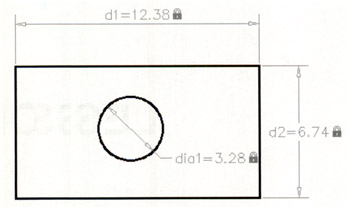
Dimensional: Dimensional constraints control the size and proportions of objects. They can constrain:
Distances between objects or between points on objects
Angles between objects or between points on objects
Sizes of arcs and circles.
Example:

Geometric constraints control the relationship of objects with respect to each other. For example, you could assign the parallel constraint to 2 individual lines to assure that they would always remain parallel.
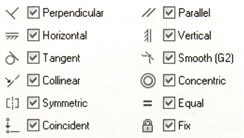
The following is a list of Geometric Constraints available and their icons:

You can apply geometric constraints to 2D geometric objects only. Objects cannot be constrained between model...